
If you have noticed there was another change at Coupons.com and now it is a little tricky to change your zip code.
If you are not aware, there are some differences in coupons depending on the zip code you use. Typically the zip codes that offer great coupons are 77477, 45435, 90210.
You can enter whatever zip you like in but on occasion I will mention a specific zip code that a coupon is listed under. You probably need to change your zip in order to get the coupon- otherwise you won’t see it.
To change your zip code requires a few simple steps:

The first step is to look in the upper right hand corner of the web site and you will see the Sign In link. Click that.
You will need to sign in with your email and password or you can click sign up to create an account.

Now that you are logged in you will see your name in the upper right side. Click that little arrow next to your name.
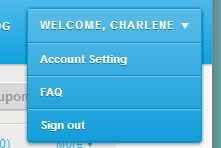
And you will see these options. Click account setting.
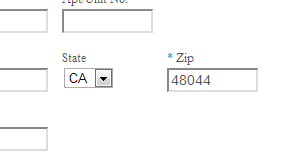
Now you should see this toward the center of the screen. Here is where you enter your zip code in. Note they want the zip and the state to match up- so what you can do is either make them match- for example CA would be the state for 90210- or if you aren’t sure just look at the very top of the state drop down box for a blank box and click that. This is handy when you are entering random zip codes in and don’t know what state they are from.

And last but not least you need to scroll all the way to the bottom where you can click this submit changes button. That will change the zip code.
So this seems like a lot of steps but really it only takes a few seconds to do once you are signed up for an account.
If you can’t remember what zip you have in or you want to test that it did change it for you, click on the local tab at the top of the page.

I can see with one quick click that I have zip code 48044 entered in right now.
So there you have it! Step by step instructions to change your zip code on coupons.com.
Thank you. I was noticing something was different lately because I was trying to print coupons from other zipcodes and not seeing the change. Now I have been educated by the great Charlene. Hip, hip, hooray!
LOL- it was the readers on the Safeway post. They kept saying they found a coupon and I couldn’t find it. Finally I figured out I was changing my zip code and it wasn’t changing. Take that coupons.com! We shall prevail no matter how often you switch things around!