
So we all know that Facebook has been crabby lately. They have stopped allowing you to see updates from your favorite pages in your news feed in order to extort outrageous sums generate more revenue.
You can get more details about all that over here.
BUT many of you suggested trying this little update and indicated it was working out really well to see what your favorite pages have been posting.
With the holidays fast approaching you might consider doing this quick update so you don’t miss any great deals. Last year my little fingers were on fire posting so many things and often I simply popped a link up on Facebook because I just couldn’t get to all the deals.
So here is what you do:
1. Go to your news feed page (home page).
2. Look at the left side and scroll down a bit until you see “add interests”
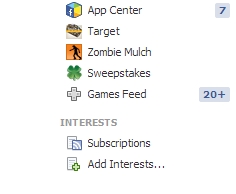
3. Click that and click “create new list”. You can title this anything you like- blogs, coupon blogs, shopping deals etc…
4. Click the pages that you would like to add to this specific list. I clicked on all the shopping, frugal, coupon, deal blogs I follow. You can add just one site or a bunch- whatever you like.

5. Click “Next” and name your list. I named mine “Shopping Deals.” You can make it public or private.
And that is it! Now when you are on your news feed page you should be able to click on your list on the left side and see (hopefully) what all your favorite blogs are posting!
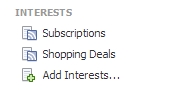
If you need more instructions, you can check out the Facebook page here.
One more little tip, once you have that set up it is easy to add pages to your list (like My Frugal Adventures!)– when you are on the page, look for this little wheel looking thing in the upper right:
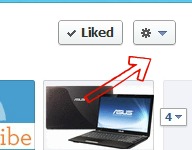
Just click that and in one second you can add the page to your interest list.
Yay!
Now to remember to check it! I believe you can play with notification settings and such if you want to be sure you don’t forget or check too late.
If you decide to try making your lists please come back and let us know how it works out for you!
*And while you are over on Facebook, you might want to enter to win a brand new laptop valued at $462!
Thank you! Great solution!
Thank you!!! This is great!!
I don’t have ADD INTERESTS on my left side…
I have favorites, groups, app, pages and friends…
not sure what to look for now… 🙁
Sandra,
Do you see anything that says more? It should be under APPS.
thanks!!!! awesome info!!!