
Alrighty so I am super behind in getting this information posted. Mostly because I get very cranky when I have to take the time to fix things that shouldn’t need fixing.
Anyway, Facebook made some big changes several weeks ago and now you will have to go through and update the information you want to receive on your news feed. I keep hearing from many of you that can’t see updates from My Frugal Adventures and hopefully this will help with the problem.
For Your Friends.
Right now you are probably only seeing some of what they post. If you would like to see everything they post, you need to watch for something that comes through on your news feed. Once you catch that you want to look for a tiny arrow on the right side.
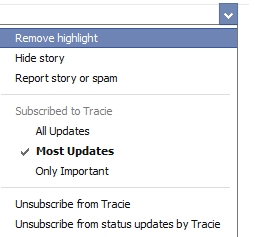
Now click on that arrow and change from Most Updates (that is the default) to All Updates.
Now you will have to change that for each of your friends- unless you prefer not to see all the updates.
For The Pages that You Follow.
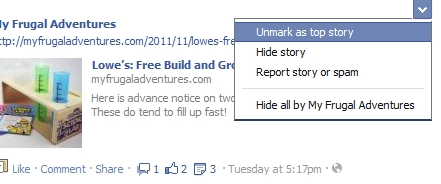
Ok now what you need to do for the pages that you follow, is you need to click that same arrow on the right side.
Mark it as a top story. (Mine is already marked as a top story as you can see.)
You might need to do this a few times and finally Facebook will start putting all the posts back in your news feed.
Create a List.
So this is a new feature that some might be interested in. You can create lists. So to so this is simple- this might be how you separate all the different sites you like to keep things straight.
So if you want to make a list, start on your homepage.
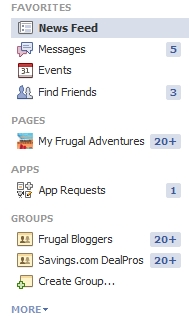 Ok so that is my current mess- and by the way this is a good time to delete any junky apps you might have. If you see apps listed from coupons and various things just click to the left of the name of the app and you can easily delete them.
Ok so now focus on where it says more at the very bottom right side. Click. Now you see lists.
This is what mine looked like- I have never done anything to it so yours probably looks similar.
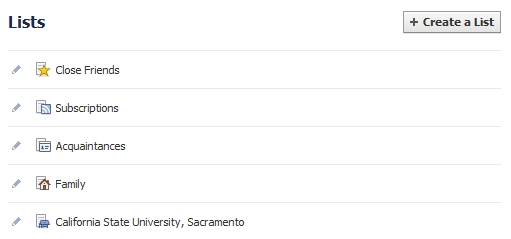
Ok so you can click that create a list and well create a list! So if you follow cooking blogs- you can create a list for those sites. If you have certain groups of people you want to lump into one- well there you go. You might also make a Deal Blog list and hopefully include My Frugal Adventures in that.
So now you started your list and it is blank. You want to click add friends in the center of the screen. That will bring up your friends. So just switch on the left side to pages rather than friends.
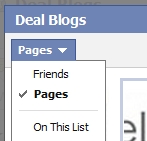
Then you go through all those pages and you just click on which ones you want to include in your list. It will highlight the page like this:
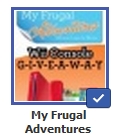 Ok now that is all done and you have your list!
Does anyone have anything else to add?
Thanks for the update! I was really bummed that your posts weren’t showing up anymore, I was having to use the search to find your updates (several times a day). I wish fb would let us know when they make changes. It’s so frustrating!
ps. love, love, love your fb page and website! =)
Ok Roberta, I’d love to know if this works and you start getting them again.
I can’t find you in my news feed at all to change the update setting. I created a list of pages and added you there. I’m not sure what else to do at this point. I even tried to “unlike” and “like” the page again. Still nothing…
Thank you SO much! I shared this for all my friends on FB … including a link to your site. 🙂
Thank you for doing all of that, it is very helpful! FB can be so confusing these days and just when I think I have it figured out, they change it again.
Yeah, I cant seem to “find” any of the pages I Follow or Like. They dont show up in my Friends list… some do show up on my news feeds and some dont. This last FB change really screwed my acct up. I cant see photos on it now either… Im clueless..